Using LLM Prompting#
This section describes the available bibcat options for extracting paper information using LLMs. Currently, only the OpenAI API is supported for prompting gpt models. The default model is gpt-5-mini, but you can customize this by setting the config.llms.openai.model field.
This code requires the openai python package. Install it with pip install openai.
To use this code you must have an OpenAI API key. Follow these instructions and set your new API key to a new OPENAI_API_KEY environment variable.
Quick Start#
Here is a quick start guide.
Follow the Setup instructions from the main README file.
Select a paper bibcode or index from the
path_source_data, located in your$BIBCAT_DATA_DIRfolder. You can either use a bibcode with the-boption, or an array list index with the-ioption. For example:run:
bibcat llm run -b "2023MNRAS.521..497M"or:
bibcat llm run -i 50
Check the response output
paper_output.jsonfile.
You should see output similar to:
INFO - Output: {'HST': ['MENTION', [0.3, 0.7]], 'JWST': ['SCIENCE', [0.9, 0.1]]}.
Here each key is a mission, the first element is the papertype, and the confidence array is ordered [science, mention].
For more details:
About the source data: Input textdata
Response format and field meanings: Response Output
How to submit papers to OpenAI: Submitting a paper
How to customize prompts and test new prompts: User Configuration and User and Agent (System) Prompts
Submitting a paper#
The cli bibcat llm run submits a prompt with paper content. The paper content can either be a local filepath on disk (See File Uploads, or a bibcode or array list index from the source dataset. When specifying a bibcode or list array index, the paper data is pulled from the source JSON dataset.
The llm run command submits a single paper. If the bibcode contains an &, enclose it in double quotes (" ") when using it on the command line.
# submit a paper
bibcat llm run -f /Users/bcherinka/Downloads/2406.15083v1.pdf

# use a bibcode from the source dataset
bibcat llm run -b 2023Natur.616..266L
bibcat llm run -b "2022A&A...668A..63R"

# submit with entry 101 from the papertrack source dataset
bibcat llm run -i 101
Running within Python#
To run within a Python environment, use the classify_paper function:
from bibcat.llm.openai import classify_paper

# classify paper 200 from the dataset
classify_paper(index=200)
which gives output
Loading source dataset: /Users/bcherinka/Work/stsci/bibcat_data/dataset_combined_all_2018-2023.json
2024-08-22 15:49:50,634 - bibcat.llm.openai - INFO - Using paper bibcode: 2023MNRAS.518..456D
2024-08-22 15:49:56,781 - bibcat.llm.openai - INFO - Output: {'HST': ['MENTION', [0.3, 0.7]], 'JWST': ['SCIENCE', [0.9, 0.1]]}
Batch Processing#
The llm batch run command submits a list of files. The list can either be specified one of two ways: 1.) individually, with the -f option, as a filename, bibcode, or index, or 2.) a file that contains a list of filenames, bibcodes, or indices to use, with one line per entry. By default, each paper in the list is submitted once. You can instruct it to submit each paper multiple times with the -n option. Run bibcat llm batch run --help to see the full list of cli options.
# batch submit a list of papers, using source index
bibcat llm batch run -f 101 -f 102 -f 103

# batch submit from a file of files
bibcat llm batch run -p papers_to_process.txt
where papers_to_process.txt might look like
2023Natur.616..266L
2023ApJ...946L..13F
2023ApJS..265....5H
2023ApJ...954...31C
Synchronous Batch Submission#
When you have a large set of papers to process with Bibcat, you can run multiple Bibcat jobs serially using the Bash script run_bibcat_serial.sh in the bins/ folder. This script processes one batch input file (typically containing 1,000 papers) at a time and then sleeps for 2 mins before starting the next job, to avoid hitting the API rate limit (model dependent). A single job of 1,000 API calls (1000 papers) depends on the models, tokens, and network traffic. With GPT-4.1-mini, it takes approximately 4,500 seconds to complete 1000 papers. The reasoning model, GPT-5-mini, could take 200-400 minutes per 1000 papers. We implemented OpenAI Batch API for more cost-effective asynchronous runs and check it out in the next section.
The script takes two arguments: the path to the folder containing the batch input files, and the path to the folder where you want to save the log files. Each batch input file should contain a list of bibcodes or indices, one per line. The script will create a log file for each batch job in the specified log folder. Note that this log file is only for the bash script output, not the Bibcat output, which is saved in the Bibcat output directory as specified in your config file.
To run this script, replace /path/to/batch_files and /path/to/logs with the actual folder paths for your batch files and logs directories.
Make sure the script is executable by running chmod +x run_bibcat_serial.sh if needed, then execute the script from the terminal using:
./run_bibcat_serial.sh /path/to/batch_files /path/to/logs
You can use the --dry-run flag to perform a test run without submitting the job.
./run_bibcat_serial.sh /path/to/batch_files /path/to/logs --dry-run
Asynchronous Batch Submission with OpenAI Batch API#
OpenAI supports asynchronous job submission via their Batch API. This API submits
a batch job to run within a 24h period. You can submit a batch paper processing job in bibcat with bibcat llm batch submit. This command takes as input a text file of bibcodes, e.g. the above papers_to_process.txt, creates the required JSONL file input for OpenAI, and submits the batch job.
First, set the batch_file parameter in your local config file, in the llms section, to the output JSONL file, e.g.
llms:
  batch_file: my_batchfile.jsonl
Then run bibcat llm batch submit -p papers_to_process.txt. This will process the bibcodes into a JSONL file, and submit the job and provide a batch ID.
bibcat.data.streamline_dataset - INFO - Loading source dataset: /Users/bcherinka/Work/stsci/bibcat_data/dataset_gs.json
...
bibcat.llm.openai - INFO - Submitting a batch run with batch ID batch_688cbdfcb5148190a4b7371fbcb3fdb0
The JSONL batch file will be located at $BIBCAT_OUTPUT_DIR/output/llms/[config.llms.openai.model]/[config.llms.batch_file].
Alternatively, if you already have a premade batch file for a given set of papers and OpenAI model, you can submit the file directly:
bibcat llm batch submit -b /Users/bcherinka/Work/stsci/bibcat_data/output/output/llms/openai_gpt-4.1-mini/my_batchfile.jsonl
Note: For large batches of papers, due to current overheads in creating prompts, it is often best to prepare your batch file once, and then submit it directly to batch submit.
You can check your batch job in your OpenAI Batch dashboard and the JSONL file in your File Storage.
To submit a batch run with a new model from the command-line, run with the -m option.
bibcat llm batch submit -f papers_to_process.txt -m gpt-4.1-mini
When specifying both a new model with -m, and an existing batch input JSONL file with the -b option, bibcat will first create a new batch file using the new model before job submission.
Retrieving the Batch#
You can check the status and retrieve the results of your batch job with bibcat llm batch retrieve, given a batch ID. To find the batch ID, copy your batch id from the log output of your job submission to use for job retrieval. You can also get the batch id by manually listing your batch jobs.
import openai
openai.client.batches.list()
Once you have the batch ID, then run:
bibcat llm batch retrieve -b batch_688cbdfcb5148190a4b7371fbcb3fdb0
If the job is still in progress, it will show:
bibcat.llm.openai - INFO - Batch run is still in progress. Please wait and try again later.
Once complete, bibcat will extract the output information, format it into bibcat’s Response Output, and save it at that location, using your prompt_output_file config parameter.
This way you can easily evaluate it with
bibcat llm batch evaulate -p papers_to_process.txt
Processing Batches#
OpenAI Rate Limits and Constraints
The OpenAI Batch API has certain contraints on the input file that can be submitted, as well as model- and organization- dependent rate limits on the number of tokens-per-day (TPD).
Maximum number of lines: 50,000
Maximum input file size: 200 MB
Daily Token Limit:
Tier 3 - gpt-5/4.1-mini: 40,000,000
Tier 4 - gpt-5/4.1-mini: 100,000,000
See Batch Limits and our Organization Tier Rate Limits for more information.
The above batch submit and batch retrieve commands only handle submissions for small-ish batches that already meet these constraints. To properly account for the limits, use the batch process command to chunk your input batch file into subsets and create an optimized submission plan.
Batch Processing in Chunks
For processing a large batch of paper that hit the OpenAI API limits, use the bibcat llm batch process command to properly chunk your input batch JSONL file into smaller file subsets for submission to the API. It splits your file into subsets and bundles them together into daily batches that stay within the daily token limit.
To analyze your file, split it into chunks specified with a chunk_XXX suffix, plan a daily batch submission schedule, and do a test dry-run with -t, run:
bibcat llm batch process -b /Users/bcherinka/Work/stsci/bibcat_data/output/output/llms/openai_gpt-4.1-mini/gs_large_batchfile.jsonl -t
Plan Output:
bibcat.llm.chunker - INFO - File analysis:
bibcat.llm.chunker - INFO -   Total lines: 60030
bibcat.llm.chunker - INFO -   File size: 40.52.03 MB
bibcat.llm.chunker - INFO -   Estimated total tokens: 1055992772
bibcat.llm.chunker - INFO -   Average tokens per line: 17563.1
bibcat.llm.chunker - INFO - Chunking plan:
bibcat.llm.chunker - INFO -   Base chunks needed: 21
bibcat.llm.chunker - INFO -   Lines per chunk: 2859
bibcat.llm.chunker - INFO -   Estimated tokens per chunk: 50285371
bibcat.llm.chunker - INFO -   Chunks per day: 1
bibcat.llm.chunker - INFO -   Days needed: 21
bibcat.llm.chunker - INFO - Creating chunk 1: /Users/bcherinka/Work/stsci/bibcat_data/output/output/llms/openai_gpt-4.1-mini/batch_chunks/gs_batchfile_chunk_001.jsonl
bibcat.llm.chunker - INFO - Creating chunk 2: /Users/bcherinka/Work/stsci/bibcat_data/output/output/llms/openai_gpt-4.1-mini/batch_new/gs_large_batchfile_chunk_002.jsonl
...
bibcat.llm.chunker - INFO - Creating chunk 21: /Users/bcherinka/Work/stsci/bibcat_data/output/output/llms/openai_gpt-4.1-mini/batch_new/gs_large_batchfile_chunk_021.jsonl
bibcat.llm.chunker - INFO - Created 21 chunk files
bibcat.llm.chunker - INFO - Saved chunk plan to /Users/bcherinka/Work/stsci/bibcat_data/output/output/llms/openai_gpt-4.1-mini/batch_chunks/gs_batchfile_chunk_plan.yaml
bibcat.llm.chunker - INFO -   Chunk 1: 2859 lines, 193.20 MB, ~51516549 tokens
bibcat.llm.chunker - INFO -   Chunk 2: 2859 lines, 192.84 MB, ~47402791 tokens
...
bibcat.llm.chunker - INFO -   Chunk 21: 2850 lines, 192.35 MB, ~50938790 tokens
bibcat.llm.chunker - INFO - Total estimated tokens across all chunks: 1054242502
bibcat.llm.chunker - INFO - Organized chunks into 21 daily batches
21 chunks remaining. Submitting next batch.
bibcat.llm.chunker - INFO - --- Day 1 Batch 1: submitting 1 chunks (~50292909 tokens) ---
bibcat.llm.chunker - INFO - Submitting chunk: gs_batchfile_chunk_001.jsonl
bibcat.llm.chunker - INFO - Submission run complete. 1 records generated.
[{'chunk': '/Users/bcherinka/Work/stsci/bibcat_data/output/output/llms/openai_gpt-4.1-mini/batch_chunks/gs_batchfile_chunk_001.jsonl', 'status': 'dry-run'}]
Running the command without -t will submit the first daily batch of chunks to OpenAI for batch processing: bibcat llm batch process -b /Users/bcherinka/Work/stsci/bibcat_data/output/output/llms/openai_gpt-4.1-mini/gs_large_batchfile.jsonl
bibcat.llm.chunker - INFO - Loaded plan state from /Users/bcherinka/Work/stsci/bibcat_data/output/output/llms/openai_gpt-4.1-mini/batch_new/gs_large_batchfile_chunk_plan.yaml
bibcat.llm.chunker - INFO - --- Day 1 Batch 1: submitting 1 chunks (~50292909 tokens) ---
bibcat.llm.chunker - INFO - Submitting chunk: gs_large_batchfile_chunk_001.jsonl
bibcat.llm.openai - INFO - Uploading batch file /Users/bcherinka/Work/stsci/bibcat_data/output/output/llms/openai_gpt-4.1-mini/batch_chunks/gs_large_batchfile_chunk_001.jsonl
 bibcat.llm.openai - INFO - Submitting a batch run with batch ID batch_68a8b1e5f89c8190bff5afda0b4dab9a
bibcat.llm.chunker - INFO - Submission run complete. 1 records generated.
[{'chunk': '/Users/bcherinka/Work/stsci/bibcat_data/output/output/llms/openai_gpt-4.1-mini/batch_chunks/gs_large_batchfile_chunk_001.jsonl',
  'status': 'submitted',
  'tokens_estimated': 50285371,
  'batch_id': 'batch_68a8b1e5f89c8190bff5afda0b4dab9a'}]
Running batch process a second time on the same day will result in an error that you
bibcat.llm.chunker - INFO - --- Day 1 Batch 2: submitting 1 chunks (~50292909 tokens) ---
bibcat.llm.chunker - INFO - Submitting chunk: gs_large_batchfile_chunk_002.jsonl
bibcat.llm.chunker - ERROR - Daily chunk submission limit reached: 1 >= 1. Estimated submission would exceed daily token limit: today+estimate=100570742, limit=100000000
Out[12]:
[{'chunk': '/Users/bcherinka/Work/stsci/bibcat_data/output/output/llms/openai_gpt-4.1-mini/batch_chunks/gs_large_batchfile_chunk_002.jsonl',
  'status': 'rejected',
  'error': 'Daily chunk submission limit reached: 1 >= 1. Estimated submission would exceed daily token limit: today+estimate=100570742, limit=100000000'}]
Run the same command again the next day to process the next batch.
Check Status
To check the status of all batches submitted, use the check, -c, flag:
bibcat llm batch process -b /Users/bcherinka/Work/stsci/bibcat_data/output/output/llms/openai_gpt-4.1-mini/gs_large_batchfile.jsonl -c
bibcat.llm.chunker - INFO - Loaded plan state from /Users/bcherinka/Work/stsci/bibcat_data/output/output/llms/openai_gpt-4.1-mini/batch_chunks/gs_large_batchfile_chunk_plan.yaml
[{'chunk': 'gs_large_batchfile_chunk_001.jsonl', 'batch_id': 'batch_68a4b230708c81908d44d556be4faadf', 'status': 'completed'}, {'chunk': 'gs_large_batchfile_chunk_002.jsonl', 'batch_id': 'batch_68a5cb9b75ec8190b253cbefbfa5812d', 'status': 'completed'}, {'chunk': 'gs_large_batchfile_chunk_003.jsonl', 'batch_id': 'batch_68a71c44de5481908c9b10027821340b', 'status': 'completed'}]
Retrieve Results
To retrieve the results of all completed batches, use the retrieve_batch, -r flag:
bibcat llm batch process -b /Users/bcherinka/Work/stsci/bibcat_data/output/output/llms/openai_gpt-4.1-mini/gs_large_batchfile.jsonl -r
bibcat.llm.chunker - INFO - Loaded plan state from /Users/bcherinka/Work/stsci/bibcat_data/output/output/llms/openai_gpt-4.1-mini/batch_chunks/gs_batchfile_chunk_plan.yaml
Retrieving completed batch results.
bibcat.llm.chunker - INFO - Retrieving batch batch_68a8850c80908190930c09dbff85c84c for chunk gs_batchfile_chunk_001.jsonl
bibcat.llm.openai - INFO - Writing batch output to /Users/bcherinka/Work/stsci/bibcat_data/output/output/llms/openai_gpt-4.1-mini/batch_chunks/gs_llm_batchtest_output_chunk_001.json
This produces chunked files (chunk_XXX) with the same name as config.llms.prompt_output_file. You can merge these together with the merge command. See below how to merge the files.
Evaluate Results
You can optionally run bibcat evaluate on each chunked output instead of on the entire sample output, with the eval_batch, -e, flag:
bibcat llm batch process -b /Users/bcherinka/Work/stsci/bibcat_data/output/output/llms/openai_gpt-4.1-mini/gs_large_batchfile.jsonl -e
bibcat.llm.chunker - INFO - Loaded plan state from /Users/bcherinka/Work/stsci/bibcat_data/output/output/llms/openai_gpt-4.1-mini/batch_chunks/gs_batchfile_chunk_plan.yaml
All batches already submitted.
Evaluating batch results.
...
bibcat.llm.io - INFO - Writing output to /Users/bcherinka/Work/stsci/bibcat_data/output/output/llms/openai_gpt-4.1-mini/batch_chunks/gs_summary_batchtest_output_chunk_001_t0.5.json
[{'chunk': 'gs_llm_batchtest_output_chunk_001.json', 'bibcode': '2018A&A...610A..11I', 'status': 'evaluated'},...]
This produces chunked files (chunk_XXX) with the same name as config.llms.eval_output_file. You can merge these together with the merge command.
Merge Chunks
To merge all llm output chunks back into a single file, use the merge, -m flag. This merges both the llm output files and any summary evaluation files. See chunker.SubmissionManager.merge_outputs for details.
bibcat llm batch process -b /Users/bcherinka/Work/stsci/bibcat_data/output/output/llms/openai_gpt-4.1-mini/gs_large_batchfile.jsonl -m
bibcat.llm.chunker - INFO - Writing merged file to /Users/bcherinka/Work/stsci/bibcat_data/output/output/llms/openai_gpt-4.1-mini/gs_llm_batchtest_output.json
bibcat.llm.chunker - INFO - Writing merged file to /Users/bcherinka/Work/stsci/bibcat_data/output/output/llms/openai_gpt-4.1-mini/gs_summary_batchtest_output_t0.5.json
User Configuration#
An example for the new llms section of the configuration.
llms:
  user_prompt: null
  agent_prompt: null
  prompt_output_file: paper_output.json # llm classification primary output
  batch_file: batch_file.jsonl # llm batch jsonl file
  llm_user_prompt: llm_user_prompt.txt  # file that can be used for the input user prompt
  llm_agent_prompt: llm_agent_prompt.txt  # file that can be used for the agent instructions
  openai:
    model: gpt-5-mini
    reasoning: medium
    verbosity: medium
    batch_daily_token_limit: 40_000_000 # for batch processing
User and Agent (System) Prompts#
User and agent prompts to the LLM can be customized through the bibcat configuration file, either via simple string prompts, specified with config.llms.[role]_prompt or via custom prompt files, specified with config.llms.llm_[role]_prompt. Use the direct string prompts for simple prompts, like ‘How old is the Earth?’. For longer, or more complex, prompts, use the custom prompt files. Custom prompt files take precedence over any config settings or defaults. A user prompt is the text you provide the LLM as the question to be answered, or the task to be performed. An agent prompt is the set of instructions, behaviors, or personality you wish the LLM model to follow when responding to your prompt.
To create a new custom user or agent prompt file, create a new text file at the location of $BIBCAT_DATA_DIR. The name of the file can be anything, but must be specified in your config.llms.llm_user_prompt, and config.llms.llm_agent_prompt fields. These fields are the filename references. The custom prompt file is preferred as it allows for the specification of larger, more complex prompt text and instructions.
If no custom prompt file is found, the code defaults to the prompts found in config.llms.user_prompt and config.llms.agent_prompt or the default agent prompt in etc/bibcat_config.yaml.
Check out Prompt Testing to test new prompts.
Testing New Prompts#
When no custom config prompts or prompt files are found, the default user prompt (etc/default_user_prompt.txt) and system prompt (etc/default_agent_prompt.txt) is used. There are three ways to change the default prompts used, to create custom prompts for trial and testing.
Note: The following are silly examples exploiting the use of bibcat, and are not indicative of package use.
Option 1 - Via Config#
For simple prompts, you can modify your config prompts directly:
llms:
  user_prompt: How large can a Beluga whale grow?
  agent_prompt: You are an professional expert on whales.  You are also witty and always respond with a clever pun.
  prompt_output_file: paper_output.json
  llm_user_prompt: null
  llm_agent_prompt: null
Running
bibcat llm run -i 0 -vin verbose mode produces:
Loading source dataset: /Users/bcherinka/Work/stsci/bibcat_data/dataset_combined_all_2018-2023.json
INFO - Using paper bibcode: 2023Natur.616..266L
WARNING - Error in prompt JSON response. Cannot convert output.
INFO - Agent Prompt: You are an professional expert on whales.  You are also witty and always respond with a clever pun.
INFO - User Prompt: How large can a Beluga whale grow?
INFO - Original Prompt Response: Beluga whales can grow to about 13 to 20 feet long, but some rare specimens can reach up to 24 feet! It seems the belugas really know how to make a "splash" when it comes to size!
INFO - Output: {'error': 'No JSON content found in response'}
Option 2 - Via Prompt File#
For more complex prompts, specify them in custom files at $BIBCAT_DATA_DIR.
Create a new text file,
my_user_prompt.txtwith the following content:
Which type of whale appeared in a 80's science fiction movie?
Create a new text file,
my_agent_prompt.txtwith the following content:
You are an professional expert on whales.
You are also witty and always respond with a clever pun.
*Always* format your response as valid JSON, with the following example as a guide:

```json
{{
"whale": "Blue",
"response": "The Blue whale weighs up to 199 tons.",
"source": "https://en.wikipedia.org/wiki/Blue_whale"
}}```

*Always* include a "source" field, which is real url link to your source of information
Modify your config file as follows:
llms:
  user_prompt: null
  agent_prompt: null
  prompt_output_file: paper_output.json
  llm_user_prompt: my_user_prompt.txt
  llm_agent_prompt: my_agent_prompt.txt
Running
bibcat llm run -i 0without verbosity produces:
Loading source dataset: /path/to/dataset.json
INFO - Using paper bibcode: 2023Natur.616..266L
WARNING - Error converting output to classification format: too many values to unpack (expected 2)
INFO - Output: {'whale': 'Humpback', 'response': "The Humpback whale is the star of 'Star Trek IV: The Voyage Home'. Talk about a cinematic whale ready for a 'fin'-tastic adventure!", 'source': 'https://en.wikipedia.org/wiki/Star_Trek_IV:_The_Voyage_Home'}
Option 3 - Toggle via CLI#
If you have multiple custom prompt files, you can quickly switch between them using the -u or -a flags on llm run, for user, and agent prompts, respectively, without modifying your config file.
Create a new text file,
my_user_prompt2.txtwith the following content:
What color was the whale that Ahab hated?
Running
bibcat llm run -i 0 -u my_user_prompt2.txt, produces:
Loading source dataset: /path/to/dataset.json
INFO - Using paper bibcode: 2023Natur.616..266L
WARNING - Error converting output to classification format: too many values to unpack (expected 2)
INFO - Output: {'whale': 'White', 'response': "Captain Ahab had a 'whale' of a problem with Moby Dick, the infamous white whale!", 'source': 'https://en.wikipedia.org/wiki/Moby-Dick'}
File Uploads#
bibcat supports uploading PDF files directly with the -f keyword, e.g.:
bibcat llm run -f /Users/bcherinka/Downloads/Guidry_2021_ApJ_912_125.pdf
This will first upload the file to OpenAI and return a reference file id. The file id is attached to the prompt, and the LLM is directed to search the attached file if no paper text is included within the prompt itself. Afterwards, the uploaded file is deleted from OpenAI.
Note: OpenAI recently consolidated its APIs into a new Responses API, which handles both text and File Input. It replaces the original Chat Completions API and the Assistants API, which is being deprecated. However, the Chat Completions API will be maintained in the long term. See Responses vs Chat Completions for a comparison between the two. All Assistant API functionality will eventually be moved into the Responses API.
Response Output#
The output response from the LLM prompt is written to a file, specified by config.llms.prompt_output_file, e.g. “paper_output.json”.
The response output is organized by the name of the file, or the bibcode of the paper. Repeated prompts using the same
paper will be appended to the entry for that paper.
By default bibcat uses Structured Response, defining a Pydantic response model as the response_format. The structure of the response is organized as follows:
notes: Notes on the LLM’s thought process and decision making
missions: a list of mission-papertype classifications
mission: the name of the mission class
papertype: the type of paper classification
confidence: an array of the LLM confidence values of [“science”, “mention”]
reason: the LLMs rationale for why it’s assigning the mission-papertype
quotes: if able, a list of direct quotes from the paper that back up the LLM’s reason. (These quotes may be hallucinated!)
For example, running bibcat llm run -b "2023Natur.616..266L" produces the following output:
  "2023Natur.616..266L": [
    {
      "notes": "I reviewed the paper and found multiple references to both JWST and HST. The JWST is explicitly noted for
      the new observations, while HST is referenced in the context of overlapping imaging with JWST's observations.
      MAST data are explicitly mentioned as part of the data processing steps.",
      "missions": [
        {
          "mission": "JWST",
          "papertype": "SCIENCE",
          "confidence": [
            0.95,
            0.05
          ],
          "reason": "The paper presents and analyzes new observational data from JWST's CEERS program.",
          "quotes": [
            "This article is based on the first imaging taken with the NIRCam on JWST as part of the CEERS
            program (Principal Investigator, Finkelstein; Program Identifier, 1345)."
          ]
        },
        {
          "mission": "HST",
          "papertype": "MENTION",
          "confidence": [
            0.1,
            0.9
          ],
          "reason": "HST data are referenced primarily for comparative purposes and indicate overlap with JWST
          observations, but no new HST data is presented.",
          "quotes": [
            "The total area covered by these initial data is roughly 40 arcmin 2 and overlaps fully with the
            existing HST\u2013Advanced Camera for Surveys (ACS) and WFC3 footprint."
          ]
        }
      ]
    },
You can turn off structured response output with the -u flag, e.g. bibcat llm run -b "2023Natur.616..266L" -u.
Evaluating Output#
To assess how well an LLM might be doing, we can try to evaluate it by running repeated trial runs, collecting the output, and comparing to the human classifications from the source dataset.
First, run bibcat llm run with the -n flag to specify to run repeated submissions of the paper, and record all outputs in the output JSON file.
To submit paper index 2000, 10 times, run:
bibcat llm run -i 2000 -n 10
Once it’s finished, you can evaluate the LLM output with:
bibcat llm evaluate -b "2020A&A...642A.105K"
You should see some output similar to
Loading source dataset: /path/to/dataset.json
INFO - Evaluating output for 2020A&A...642A.105K
INFO - Number of runs: 3
INFO - Human Classifications:
 KEPLER: SCIENCE
Output Stats by LLM Mission and Paper Type:
llm_mission llm_papertype mean_llm_confidences std_llm_confidences  count  n_runs  weighted_confs  consistency  in_human_class  mission_in_text  hallucination_by_llm
         K2       MENTION           [0.2, 0.8]          [0.0, 0.0]      1       3  [0.067, 0.267]          0.0          False            False                  True
         K2       SCIENCE         [0.85, 0.15]        [0.05, 0.05]      2       3  [0.567, 0.100]          0.0          False            False                  True
     KEPLER       SCIENCE         [0.92, 0.08]        [0.02, 0.02]      3       3  [0.920, 0.080]        100.0          True              True                 False
INFO - Missing missions by humans: K2
INFO - Missing missions by LLM:
INFO - Hallucination by LLM: K2
Writing output to /path/to/output/llms/openai_gpt-4o-mini/summary_output_t0.7.json
The output is also written to a file specified by config.llms.eval_output_file.
For now, this produces a Pandas dataframe grouped by the LLM predicted mission and papertype, with its mean confidence score and the number of times that combination was output by the LLM. It also includes the total number of trial runs, frequency-weighted confidence values, an accuracy score of how well it matched the human classification, and a boolean flag if that combination appears in the human classification. The human classification comes from the “class_missions” field in the source dataset file.
Alternatively, you can both submit a paper for classification and evaluate it in a single command using the -s, --submit flag. In combination with the -n flag,
this will classify the paper num_runs times before evaluation.
This example first classifies paper index 1000, 20 times, then evaluates the output.
bibcat llm evaluate -i 1000 -s -n 20
Loading source dataset: /path/to/dataset.json
INFO - Using paper bibcode: 2022SPIE12184E..24M
INFO - Output: {'JWST': ['MENTION', 0.7]}
INFO - Using paper bibcode: 2022SPIE12184E..24M
INFO - Output: {'JWST': ['MENTION', 0.5]}
INFO - Using paper bibcode: 2022SPIE12184E..24M
INFO - Output: {'JWST': ['MENTION', 0.7]}
...
INFO - Evaluating output for 2022SPIE12184E..24M
INFO - Number of runs: 20
INFO - Human Classifications:
 JWST: MENTION
INFO - Output Stats by LLM Mission and Paper Type:
llm_mission llm_papertype  mean_llm_confidence  std_llm_confidence  count  n_runs  consistency  in_human_class   mission_in_text
       JWST       MENTION                  0.5            0.107606     20      20        100.0            True            True
INFO - Missing missions by humans:
INFO - Missing missions by LLM:
Output Columns#
Definitions of the output columns from the evaluation.
Summary output#
human: Human classifications
threshold_acceptance: The threshold value to accept the llm’s classifications
threshold_inspection: The threshold value to require human inspection
llm: llm’s classification whose confidence value (
total_weighted_conf) is higher than or equal to the threshold value. Each entry is organized as:“mission”: “papertype” (the mission and papertype classification)
confidence: the list of final LLM confidences values for [science, mention] papertype classification, same as
total_weighted_confin “mission_conf”mission_probability: the probability that the specified mission is relevant to the paper, same as
prob_missionin “mission_conf”
inspection: The list of missions/papertypes for human inspection due to the edge-case confidence values
missing_by_human: The set of missing missions by human classification
missing_by_llm: The set of missing missions by llm classification
hallucinated_missions: The list of missions hallucinated by llm
Mission + papertype summary, “df”#
This data frame represents stats based on each mission + papertype callout
llm_mission: The mission from the LLM output
mean_llm_confidence: The list of the mean confidence values of SCIENCE and MENTION across all trial runs, for each mission + papertype combination. Conditional probabilities. Sum to 1.
std_llm_confidence: The standard deviation of the confidence values of SCIENCE and MENTION across all trial runs
count: The number of times a mission + papertype combo was included in the LLM response, across all trial runs
llm_papertype: The papertype from the LLM output
n_runs: The total number of trial runs
weighted_confs: Frequency-weighted confidence values. The “mean_llm_confidence” scaled by the fraction of runs in which the mission+papertype appeared. Combined measure of frequency and confidence.
consistency: The percentage of how often the LLM mission + papertype matched the human classification
in_human_class: Flag whether or not the mission + papertype was included in the set of human classifications
mission_in_text: Flag whether or not the mission keyword is in the source paper text
hallucination_by_llm: Flag whether or not the mission keyword is hallucinated by LLM, i.e., mission is not found in text
Mission statistics, “mission_conf”#
This data frame represents stats based on each mission callout
llm_mission: The mission from the LLM output
total_mission_conf: The total confidence value for the given mission. Sum of all weighted [science, mention] conf values.
total_weighted_conf: The total frequency-weighted confidence values for the given mission, by [science, mention]
prob_mission: Measures the relative probability of mission (
total_mission_conf) to all missionsprop_papertype: Within each mission, the probability the mission is a science vs mention papertype
Example Output#
An example output file would look like:
{
  "2022Sci...377.1211L": {
    "human": {
      "TESS": "SCIENCE"
    },
    "threshold_acceptance": 0.7,
    "threshold_inspection": 0.5,
    "llm": [
      {
        "TESS": "SCIENCE",
        "confidence": [
          0.809,
          0.191
        ],
        "probability": 0.98
      }
    ],
    "inspection": [],
    "missing_by_human": [
      "HST"
    ],
    "missing_by_llm": [],
    "hallucinated_missions": [
      "HST"
    ],
    "df": [
      {
        "llm_mission": "HST",
        "llm_papertype": "SCIENCE",
        "mean_llm_confidences": [
          0.8,
          0.2
        ],
        "std_llm_confidences": [
          0.0,
          0.0
        ],
        "count": 1,
        "n_runs": 50,
        "weighted_confs": [
          0.016,
          0.004
        ],
        "consistency": 0.0,
        "in_human_class": false,
        "mission_in_text": false,
        "hallucination_by_llm": true
      },
      {
        "llm_mission": "TESS",
        "llm_papertype": "MENTION",
        "mean_llm_confidences": [
          0.23,
          0.78
        ],
        "std_llm_confidences": [
          0.11,
          0.11
        ],
        "count": 4,
        "n_runs": 50,
        "weighted_confs": [
          0.018,
          0.062
        ],
        "consistency": 0.0,
        "in_human_class": false,
        "mission_in_text": true,
        "hallucination_by_llm": false
      },
      {
        "llm_mission": "TESS",
        "llm_papertype": "SCIENCE",
        "mean_llm_confidences": [
          0.86,
          0.14
        ],
        "std_llm_confidences": [
          0.05,
          0.05
        ],
        "count": 46,
        "n_runs": 50,
        "weighted_confs": [
          0.791,
          0.129
        ],
        "consistency": 92.0,
        "in_human_class": true,
        "mission_in_text": true,
        "hallucination_by_llm": false
      }
    ],
    "mission_conf": [
      {
        "llm_mission": "HST",
        "total_mission_conf": 0.02,
        "total_weighted_conf": [
          0.016,
          0.004
        ],
        "prob_mission": 0.02,
        "prob_papertype": [
          0.8,
          0.2
        ]
      },
      {
        "llm_mission": "TESS",
        "total_mission_conf": 1.0,
        "total_weighted_conf": [
          0.809,
          0.191
        ],
        "prob_mission": 0.98,
        "prob_papertype": [
          0.809,
          0.191
        ]
      }
    ]
  }
}
This evaluation command will create a file of the bibcodes missing from the source dataset, missing_source_bibcodes.txt.
Batch Evaluation#
You can batch evaluate a list of papers/bibcodes with the llm batch evaluate command. For example, to submit a list of bibcodes to llm batch run,
with 20 runs each paper, then batch evaluate them, run:
bibcat llm batch evaluate -p bibcode_list.txt -s -n 20
Plotting Evaluation Plots#
You can assess model performance using confusion matrix plots or Receiver Operating Characteristic (ROC) curves. A confusion matrix plot helps evaluation classification model performance by showing true positives (\(TP\)), true negatives (\(TN\)), false positives (\(FP\)), and false negatives (\(FN\)), making it useful for understanding evaluation metrics such as
\(\text{Accuracy} = \dfrac{TP + TN}{TP + TN + FP + FN}\)
\(\text{Precision} = \dfrac{TP}{TP + FP}\)
\(\text{Recall} = \dfrac{TP}{TP + FN}\)
\(F_1 = 2 \times \dfrac{\text{Precision} \times \text{Recall}}{\text{Precision} + \text{Recall}}\)
A ROC curve evaluates a model’s ability to distinguish between classes by plotting the true positive rate against the false positive rate at various thresholds, with the area under the curve (AUC) which represents the degree of separability between classes. For instance, AUC = 1.0 indicates perfect and AUC =0.5 is as good as random guessing. To provide more reliable and stable performance metrics, larger datasets (hundreds or thousands) are recommended. With small datasets, you make interpreations less reliable.
Confusion Matrix Plot#
To plot confusion matrices for specific missions (default threshold probability = 0.5), run:
bibcat llm plot -c -m HST -m JWST
To plot confusion matrices for all missions, run:
bibcat llm plot -c -a
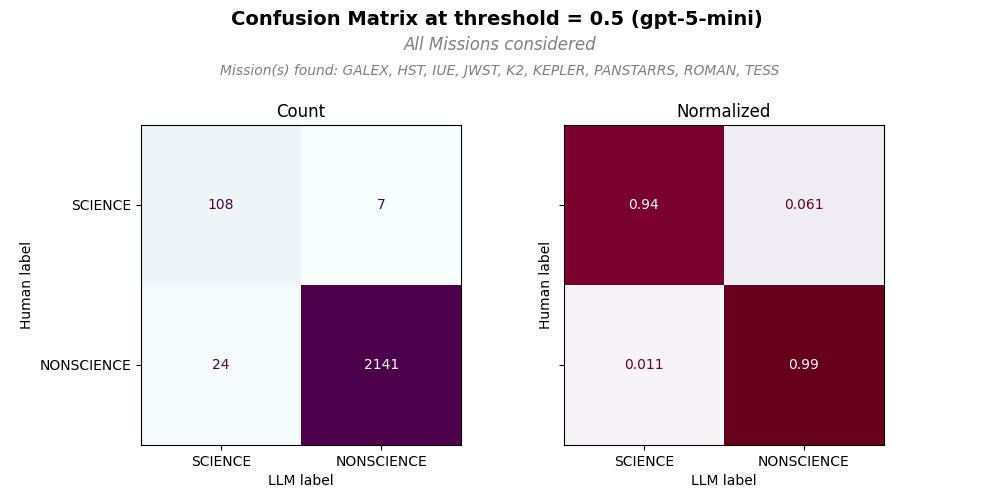
In the example confusion matrix (CM) plot, we have both counts (left panel) and normalized counts (right panel). All counts were considered if the confidence value of each LLM classification is >= 0.5 (threshold = 0.5). We can see the distribution of true positives (top left quadrant), false positives (bottom left quadrant), true negatives (bottom right quadrant), and false negatives (top right quadrant) for the specified missions. This visualization helps in understanding the model’s performance and identifying areas for improvement. Note that in this figure, all MAST missions were considered to create CM, but only a subset of the missions in the annotation, Mission(s) found: were actually called out by human and LLM as seen in. The missions not found in the sample only contribute to true negatives.
These commands will also create metrics summary files ( *metrics_summary_t0.5.txt and *metrics_summary_t0.5.json).
Metrics Summary Output#
Text Output for Metrics Summary#
The outuput would look like
The number of bibcodes (papers) for evaluation metrics: 89
The number of mission callouts by human: 217
The number of mission callouts by llm with the threshold value, 0.5: 222

The number of mission callouts by both human and llm: 132
Missions called out by both human and llm: FUSE, GALEX, HUT, IUE, K2, KEPLER, PANSTARRS, TESS, WUPPE

The number of non-MAST mission callouts by llm: 2
Non-MAST missions called out by llm: EDEN, NUSTAR

2 papertypes: NONSCIENCE, SCIENCE are labeled
True Negative = 1569, False Positive = 26, False Negative = 20, True Positive = 33

classification report
               precision    recall  f1-score   support

  NONSCIENCE     0.9874    0.9837    0.9856      1595
     SCIENCE     0.5593    0.6226    0.5893        53

    accuracy                         0.9721      1648
   macro avg     0.7734    0.8032    0.7874      1648
weighted avg     0.9736    0.9721    0.9728      1648
Jason Output for Metrics Summary#
The definitions of the JSON output columns are following.
n_bibcodes: The total number of bibcodes (papers) for confusion matrix evaluation per given mission(s)
n_human_callouts: The number of all callouts by human found in the source dataset
n_llm_callouts: The number of all callouts by llm with the threshold value in the llm output file
n_missing_output_bibcodes: The number of bibcodes missing from the llm output file
n_non_mast_callouts: The number of non-MAST mission callouts by llm from the llm output file
non_mast_missions: The list of non-MAST missions called out by llm from the llm output file
human_llm_missions: The list of missions called out by both human and llm for given mission(s)
n_human_llm_mission_callouts: The number of callouts by both human and llm for human_llm_missions
n_human_llm_hallucination: The number of hallucinated callouts by llm for human_llm_missions
NONSCIENCE: The classification report metrics for NONSCIENCE papertype
SCIENCE: The classification report metrics for SCIENCE papertype
macro avg: The macro average metrics across all papertypes
weighted avg: The weighted average metrics across all papertypes
precision: precision score
recall: recall score
f1-score: F1-score
support: Total number of occurrences across papertype(s)
accuracy: Overall accuracy of the classification
fp_bibcodes: The list of false positive bibcodes with details
fn_bibcodes: The list of false negative bibcodes with details
tp_bibcodes: The list of true positive bibcodes with details
tn_bibcodes: The list of true negative bibcodes with details
bibcode: The bibcode of the paper
mision: The mission name
human_raw: The original human classification for the mission before mapping to SCIENCE/NONSCIENCE
SCIENCE, MENTION, DATA_INFLUENCED, SUPERMENTION, ENGINEERING, and GREY or GRAY are available
IGNORED is introduced to tag mission with no classification by human for that mission in the source dataset
llm_raw: The original llm classification (SCIENCE, MENTION) for the mission before mapping to SCIENCE/NONSCIENCE
IGNORED is introduced to tag mission with no classification by human for that mission
An example output file would look like:
{
  "n_bibcodes": 89,
  "n_human_callouts": 217,
  "n_llm_callouts": 222,
  "n_missing_output_bibcodes": 5,
  "n_non_mast_callouts": 0,
  "non_mast_missions": [],
  "human_llm_missions": [
    "HST",
    "JWST",
  ],
  "n_human_llm_mission_callouts": 80,
  "n_human_llm_hallucination": 5,
  "NONSCIENCE": {
    "precision": 0.9901538461538462,
    "recall": 0.9834963325183375,
    "f1-score": 0.9868138607789022,
    "support": 1636.0
  },
  "SCIENCE": {
    "precision": 0.5909090909090909,
    "recall": 0.7090909090909091,
    "f1-score": 0.6446280991735537,
    "support": 55.0
  },
  "accuracy": 0.9745712596096984,
  "macro avg": {
    "precision": 0.7905314685314686,
    "recall": 0.8462936208046232,
    "f1-score": 0.815720979976228,
    "support": 1691.0
  },
  "weighted avg": {
    "precision": 0.9771683573670563,
    "recall": 0.9745712596096984,
    "f1-score": 0.9756842233523534,
    "support": 1691.0
  },
  "fp_bibcodes": [
    {
      "bibcode": "bibcode1",
      "mision": "HST",
      "human_raw": "MENTION",
      "llm_raw": "SCIENCE"
    },
    {
      "bibcode": "bicode12",
      "mision": "JWST",
      "human_raw": "IGNORED",
      "llm_raw": "SCIENCE"
    }
  ],
  "fn_bibcodes": [
    {
      "bibcode": "bibcode2",
      "mision": "HST",
      "human_raw": "SCIENCE",
      "llm_raw": "MENTION"
    },
    {
      "bibcode": "bibcode2",
      "mision": "HST",
      "human_raw": "SCIENCE",
      "llm_raw": "IGNORED"
    },
  ],
  "tp_bibcodes": [
    {
      "bibcode": "bicode30",
      "mision": "JWST",
      "human_raw": "SCIENCE",
      "llm_raw": "SCIENCE"
    },
  ],
   "tn_bibcodes": [
    {
      "bibcode": "bicode30",
      "mision": "HST",
      "human_raw": "IGNORED",
      "llm_raw": "MENTION"
    },
    {
      "bibcode": "bicode35",
      "mision": "HST",
      "human_raw": "MENTION",
      "llm_raw": "MENTION"
    }
  ]
}
Receiver Operating Characteristic (ROC) Plot#
To plot a confusion matrix for specific missions, run:
bibcat llm plot -r -m HST -m JWST
To plot a confusion matrix for all missions, run:
bibcat llm plot -r -a
Statistics output#
After running bibcat GPT classification using bibcat llm run, bibcat llm batch run, or bibcat llm evaluate to generate classifications for papers, you may want to review various statistics. These statistics can include the number of papers per mission and papertype, the count of accepted papertypes, and the number of papers that require human inspection due to low confidence scores.
From the evaluation summary output file, you may want to see the list of the papers where human classifications are not consistent with llm classifications. The next command line will also create this file.
The filenames are defined in bibcat_config.yaml: eval_output_file, ops_output_file, and inconsistent_classification_file.
To create a statistics JSON file, use the command line options listed below.
Evaluation summary statistics for mission+papertype pairs#
To create a statisitics output from the evaluation summary output, e.g., summary_output_t0.7.json, run:
bibcat llm stats -e
The output file name will be something like evaluation_stats_t0.7.json where t0.7 refers to the threshold value, 0.7 to accept the llm’s papertype.
This command line will also create a file for the list of the papers where human classifications are not consistent with llm classifications.
Operation classification statistics for mission+papertype pairs#
This output will provide various number counts including the number of papers with accepted papertype which meets this condition threshold_acceptance >= confidence and the number of papers required for human inspection (threshold_inspection <= confidence < threshold_acceptance) for final papertype assignment. It also includes the lists of bibcodes of accepted papertypes and inspection required for human inspection.
To create statisitics output files,operation_stats_t0.7.json and operation_stats_t0.7.txt from the llm classification output for operation, paper_output.json, run:
bibcat llm stats -o
INFO - reading /Users/jyoon/GitHub/bibcat/output/output/llms/openai_gpt-4o-mini/paper_output.json
INFO - threshold for accepting llm classification: 0.7
INFO - threshold for inspecting llm classification: 0.4
INFO - Production counts by LLM Mission and Paper Type:
   mission papertype  total_count  accepted_count  inspection_count
     GALEX   MENTION            4               4                 0
     GALEX   SCIENCE            2               2                 0
       HST   MENTION           22              21                 1
       HST   SCIENCE            4               4                 0
      JWST   MENTION            8               8                 0
      JWST   SCIENCE           17              17                 0
Statistics Output columns#
Both the evaluation and operation statistics files share the same column names.
Statistics Output#
The definitions of the JSON output columns are following.
threshold_acceptance: The threshold value to accept the LLM papertype classification
threshold_inspection: The threshold value to require human inspection
mission: MAST mission
papertype: papertype classified by LLM
total_count: The total number of papers
accepted_count: The count of papers with accepted llm papertype
accepted_bibcodes: The bibcode list of the papers with accepted llm papertype
inspection_count: The count of papers required for human inspection
inspection_bibcodes: The bibcode list of the papers for papertype required human inspection
The statistics .txtoutput file shows the table view of mission, papertype, total_count accepted_count, and inspection_count.
   mission papertype  total_count  accepted_count  inspection_count
     GALEX   MENTION            4               4                 0
     GALEX   SCIENCE            2               2                 0
       HST   MENTION           22              21                 1
       HST   SCIENCE            4               4                 0
      JWST   MENTION            8               8                 0
      JWST   SCIENCE           17              17                 0
Audit inconsistent classifications#
The command line command, bibcat llm audit, will create a json file (config.llms.inconsistent_classifications_file) of failure bibcode + mission classifications and its summary counts. To create an audit summary and inconsistent classification breakdown, run this command:
bibcat llm audit
File output for the inconsistent classifications#
The command line command, bibcat llm audit, will create a json file (config.llms.inconsistent_classifications_file) of failure bibcode + mission classifications and its summary counts. It also create a json file (llm_only_classified_list_for_audit.json) which collects the bibcode items that human didn’t classify any misisons but LLM classifies missions. You can use this list to further investigate if LLM hallucinates or human mistakenly missed classifications.
The definitions of the JSON output columns are following.
summary_counts : stats summary of inconsistent classifications
n_llm_only_classified_bibcodes : the number of bibcodes that human didn’t classify any missions but LLM classifies missions
n_total_bibcodes: the number of total bibcodes
n_matched_classifications: the number of matched classifications
n_mismatched_bibcodes: the number of mismatched (failure) bibcode
n_mismatched_classifications: the number of mismatched (failure) classifications
false_positive: false positive classification (e.g., human: MENTION and llm: SCIENCE)
false_negative: false negative classification (e.g., human: SCIENCE and llm: MENTION)
false_negative_because_ignored: false negative classification due to LLM ignored the paper(e.g., human: SCIENCE and llm: [])
ignored: LLM ignored the paper but human papertype is other than SCIENCE
The rest shows the breakdown of each failure bibcode
The output example is as follows:
{
  "summary_counts": {
    "n_total_bibcodes": 89,
    "n_llm_only_classified_bibcodes": 1,
    "n_matched_classifications": 81,
    "n_mismatched_bibcodes": 65,
    "n_mismatched_classifications": 134,
    "false_positive": 32,
    "false_negative": 6,
    "false_negative_because_ignored": 20,
    "ignored": 76
  },
  "bibcodes": {
    "2018A&A...610A..11I": {
      "failures": {
        "GALEX": "false_positive"
      },
      "human": {
        "GALEX": "MENTION",
        "PANSTARRS": "SCIENCE"
      },
      "llm": [
        {
          "GALEX": "SCIENCE",
          "confidence": [
            1.0,
            0.0
          ],
          "mission_probability": 0.5
        },
        {
          "PANSTARRS": "SCIENCE",
          "confidence": [
            1.0,
            0.0
          ],
          "mission_probability": 0.5
        }
      ],
      "missions_not_in_text": []
    },
    "2020A&A...633A..48F": {
      "failures": {
        "flag": "llm_only_classified"
      },
      "human": {},
      "llm": [
        {
          "HST": "MENTION",
          "confidence": [
            0.2,
            0.8
          ],
          "mission_probability": 0.25
        },
      ]
    }
}